

Roles, branding & help
Set it up the way your shop works.
Every access decision we made ships as a default you can change — per role, or for one person. Your name and colors are on everything. And when someone has a question, the answer is a click away on the screen they are looking at.
Roles and permissions
Roles grant permissions. You decide what each role grants.
Loan officer, processor, underwriter, closer, manager, the desks — each role carries a set of permissions, with defaults that match how most shops run. Change any of them for the role, or give one person an exception.
- Roles add up. Someone who is a processor and a closer gets both.
- See why. Effective Access lists what each person can do and which role or exception gave it.
- Changes are recorded — who changed what, and when.


White label
Your company on every screen and every email.
Each lender runs its own instance — your name, your logo, your brand color, your address. Borrowers and employees see your company, not ours.
Logo, icon and color
Set once in Settings; the app, the browser tab and every email follow. The examples on this site use a sample lender’s brand to show it.
Emails in your brand
Signing links, holds, @mentions, credit warnings and the morning summary all carry your name and color, and borrower emails come from the loan officer.
Email signatures, generated
Each loan officer’s signature is built from their profile — name, title, NMLS number, contact details and links — ready to install in Outlook.
Help center
Answers on the screen, not in a support inbox.
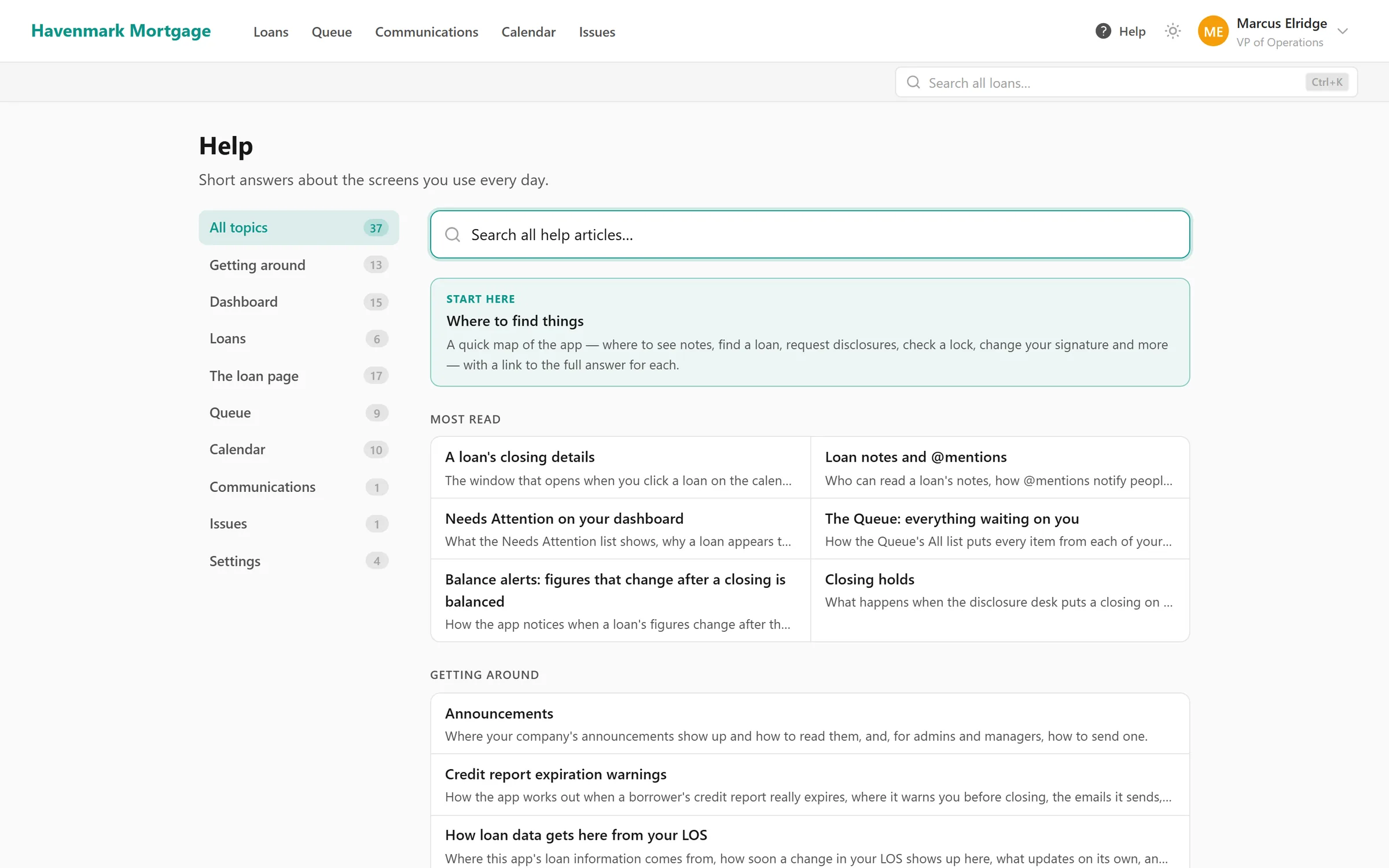
Every screen has a help article, and the help button on a screen opens its article right beside it. Articles show the real screen with made-up loans — like the examples on this site — and leave out what the reader’s role doesn’t let them do.
- Searchable, with the most-read articles up front.
- Kept current. When a screen’s labels change, the build fails until its article does too.
Announcements
Send a message to everyone, to chosen roles or to named people. It pops up for anyone who has the app open, waits on the dashboard for everyone else, and can go by email too.
A morning summary
Each person can get one email at the time your company chooses: closing holds, returned files, disclosure, lock and credit alerts, unread notes and texts, and the closings coming up. On a morning with nothing for them, nothing is sent.
Questions
About roles, branding and help
How granular are the permissions?
Each role has its own set — which loans it can open, whether it sees margins or compensation, whether it can place closing holds, read other people’s notes, see the management view, and more. Someone can hold several roles; they get everything their roles give, together. An exception changes one thing for one person without touching their role.
Can we see why someone can or can’t do something?
Yes. Effective Access shows every permission each person has and the reason — which role gave it, or which exception. Every change to a role or an exception is recorded with who made it.
Whose brand do borrowers see?
Yours. Your company name, logo and brand color are on every screen and every email the app sends, and each loan officer’s email signature is generated from their profile in your branding.
Is there help for our team inside the app?
Yes — a searchable help center with an article for every screen, reachable from a help button on the screen itself, showing what each person’s role actually lets them do.
Keep going
The rest of the day, covered.
Needs Attention
Locks about to expire, disclosures due, closings on hold and credit about to lapse — with a name on each — before anyone has to ask.
Learn moreWork queues
One list per desk — disclosures, locks, file setup, closings — sorted by deadline, claimed by a person, and nothing waiting in an inbox.
Learn moreCompliance training
Training and policy acknowledgments with records nobody can edit or delete — not a manager, not an admin, not us.
Learn moreEarly access
Opening to new lenders soon.
NinthOar is in daily use at a lender today. Tell us about your shop, and we’ll reach out as soon as we can take you on.