

Borrower texting
Borrowers text the loan, not a loan officer’s cell phone.
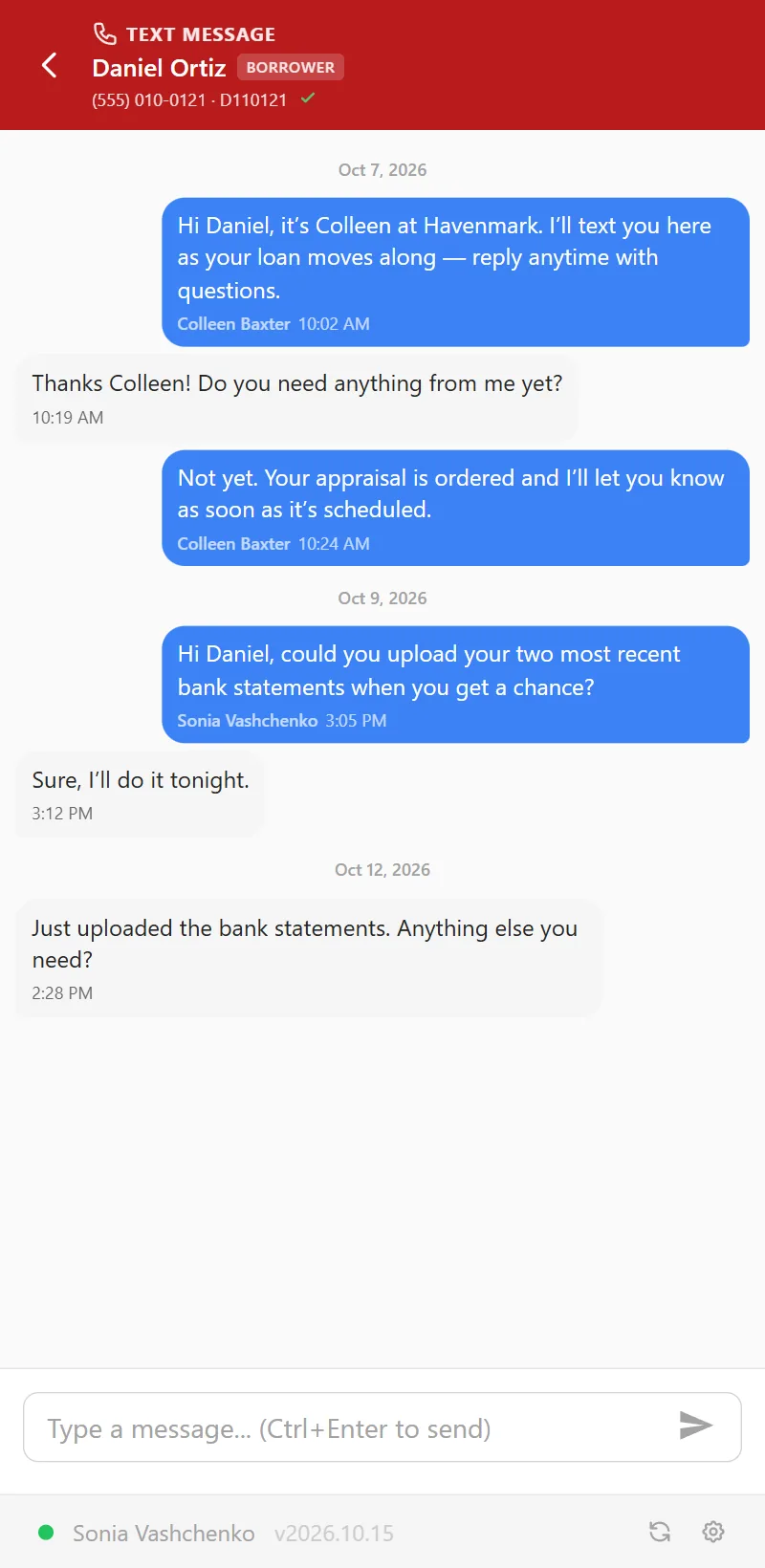
Each loan officer gets a business texting number. Every text in and out lands on the loan it belongs to, so the processor, the assistant and the closer read the same conversation — and when the loan officer is out, or leaves, the thread is still in the file.
A loan’s texts
One conversation, the whole team.
Texts go out from the loan officer’s number, whoever on the team sends them. The borrower sees one number; your team sees who sent each text. Replies come back to the loan, where everyone who works it can read them.
- Delivery you can see. A clock while a text waits, one check when it’s sent, two when it reaches the borrower’s phone — and the phone company’s reason when it doesn’t.
- Pictures and PDFs, both ways — up to ten files in a text.
- Each borrower, their own conversation. A co-borrower texts separately, on the same loan.
- Only the borrowers on the loan, at the numbers in your LOS — never a number someone typed in.


Consent
On the record before anyone texts.
Texting borrowers is regulated, and the rules are built into the screen rather than left to memory.
Consent, recorded
Your company decides whether consent comes first. When it does, the box stays grayed out until someone records how the borrower agreed — verbally, in writing or electronically — and the conversation keeps who recorded it and when.
STOP, honored automatically
A borrower who replies STOP, CANCEL or UNSUBSCRIBE is opted out at once: the loan gets a note, the team gets a pop-up, and every text to them is blocked until they text START. “Can we cancel the 3pm?” is just a text.
Opt-outs by phone, too
When a borrower asks on a call or by email not to be texted, anyone on the loan records the opt-out. The loan notes who recorded it, and it stands until someone records consent again.
Nothing waits on one phone
New texts land where the team already looks.
A borrower’s unread text is on the Needs Attention list of everyone on the loan, and pops up on whatever page they have open. Open it in place and reply without leaving the dashboard. A borrower who opts out is listed too, so somebody calls.
- Texts from unknown numbers are held, not lost. A new phone, a spouse: the loan officer and their assistant are told, and one of them attaches the conversation to the right loan — or dismisses a wrong number.
- Then it routes itself. Once the number is on the loan in your LOS, its next text goes straight onto the loan.
- You choose who hears. Pick which roles on a loan’s team get the pop-up for a new text.
Beside LendingPad
Reply without leaving the loan.
The NinthOar side panel shows the same conversations beside the loan open in LendingPad. A processor answers a borrower’s question from the file they are already in — no second tab, no personal phone.
Set up once
Your admin decides how your shop texts.
A number per loan officer
Assigned in Settings. Everyone on a loan’s team texts from that loan officer’s number, so a borrower never has to wonder who is writing.
Who may text
Give texting to a role, or to one person. Anyone who can open a loan can read its texts; sending is a permission of its own.
Consent your way
Require consent before anyone texts, or don’t. Either way STOP is honored, and opt-outs show on the team’s lists.
Questions
About borrower texting
Which number do borrowers see?
The loan officer’s business texting number. Each loan officer is given one, and everyone on their loans texts from it — so a borrower always sees one number for their loan, while your team sees who sent each text.
What happens when a borrower texts STOP?
They’re opted out on the spot. A reply that is only STOP, STOPALL, UNSUBSCRIBE, CANCEL, END, QUIT, REVOKE or OPT OUT counts; “Can we cancel the 3pm?” doesn’t. The loan gets a note, the team gets a pop-up, and texts to that borrower are blocked until they text START back.
Do we have to record consent before texting?
Your company decides. When consent is required, nobody can text a borrower until someone records how they agreed — and that holds even when the borrower texted first. Who recorded it, how and when stays on the conversation.
Who can read a loan’s texts?
Anyone who can open the loan. Sending is a permission of its own, given to a role or to one person — so an assistant can follow a conversation without being able to reply, if that is how your shop works.
What if a borrower texts from a number we don’t have?
The text is held, not lost. The loan officer and their assistant are told about a text from an unknown number, and either of them attaches it to the right loan — saying who is texting — or dismisses it as a wrong number.
Does texting work with LendingPad?
Yes. Borrowers’ phone numbers come from the loan in LendingPad, every text lands on that loan in NinthOar, and the side panel shows the conversation beside the loan open in LendingPad. Texts are never written back to LendingPad. How the LendingPad integration works.
Who carries the texts?
Twilio. US carriers require business texting to be registered, in your company’s name, before it is sent (A2P 10DLC); NinthOar’s settings take an admin through each step. Approval is up to the carriers and usually takes a few weeks.
Keep going
The rest of the day, covered.
The loan page
Everything about one loan on one screen: health, milestones, disclosures and who has signed, notes with @mentions, and what the borrower was sent.
Learn moreThe side panel
Notes, alerts and borrower texts beside the loan open in LendingPad — a Chrome side panel that follows the file on screen.
Learn moreNeeds Attention
Locks about to expire, disclosures due, closings on hold and credit about to lapse — with a name on each — before anyone has to ask.
Learn moreEarly access
Opening to new lenders soon.
NinthOar is in daily use at a lender today. Tell us about your shop, and we’ll reach out as soon as we can take you on.