

Closings
The closing calendar everyone actually works from.
Every scheduled closing, colored by where the file really is, with each closing’s checklist, signing progress and notes one click away — and the problems that sink a closing raised while there is still time to fix them.


Calendar views and filters
Closing or funding view
Put each loan on the day it closes, or the day it funds — worked out for a refinance’s rescission period, not copied from a field someone forgot to update.
Counts that filter
Total closings, not clear to close, clear to close, closed and funded — plus lock expired, CD unsigned, CD urgent and on hold when there are any. Click one to see just those loans.
One loan officer at a time
Narrow the month to one loan officer’s closings for a pipeline meeting, then back to everyone. Federal holidays are marked on the days they fall.
On a phone
A month you tap through.
On a phone the calendar is a month with a mark under each day — red for a hold, an urgent CD or an expired lock, amber for anything not yet clear, green for on track. Tap a day for its closings, then a closing for its details, full screen.
- Today and Closing | Funding sit at the bottom, under your thumb.
- Swipe for the next month, and the phone’s Back button closes a closing you opened.
Closing details
Each closing’s checklist, signing and lock.
Click a closing for its timeline from application to funding, its lock — and whether the lock outlasts funding — its closing notes, and the four steps before closing: sent to the settlement agent, CD disclosed, collaborated and balanced, package sent.
- Steps that check themselves. CD Disclosed checks when the closing disclosure goes out for signing; on an eClosing, Package Sent does too.
- Your settlement terms. The first step reads attorney, title company, escrow agent or settlement agent — however your company closes.
eClosing and wet sign
Followed all the way to Ready to Fund.
On an eClosing, each step is recorded as your eSign provider reports it: package sent, eSign window open, signed. Hybrid closings wait for the ink-signed pages; wet-sign closings are checked off by the desk. The calendar card says where each one stands.
Holds
When a closing stops, everyone hears.
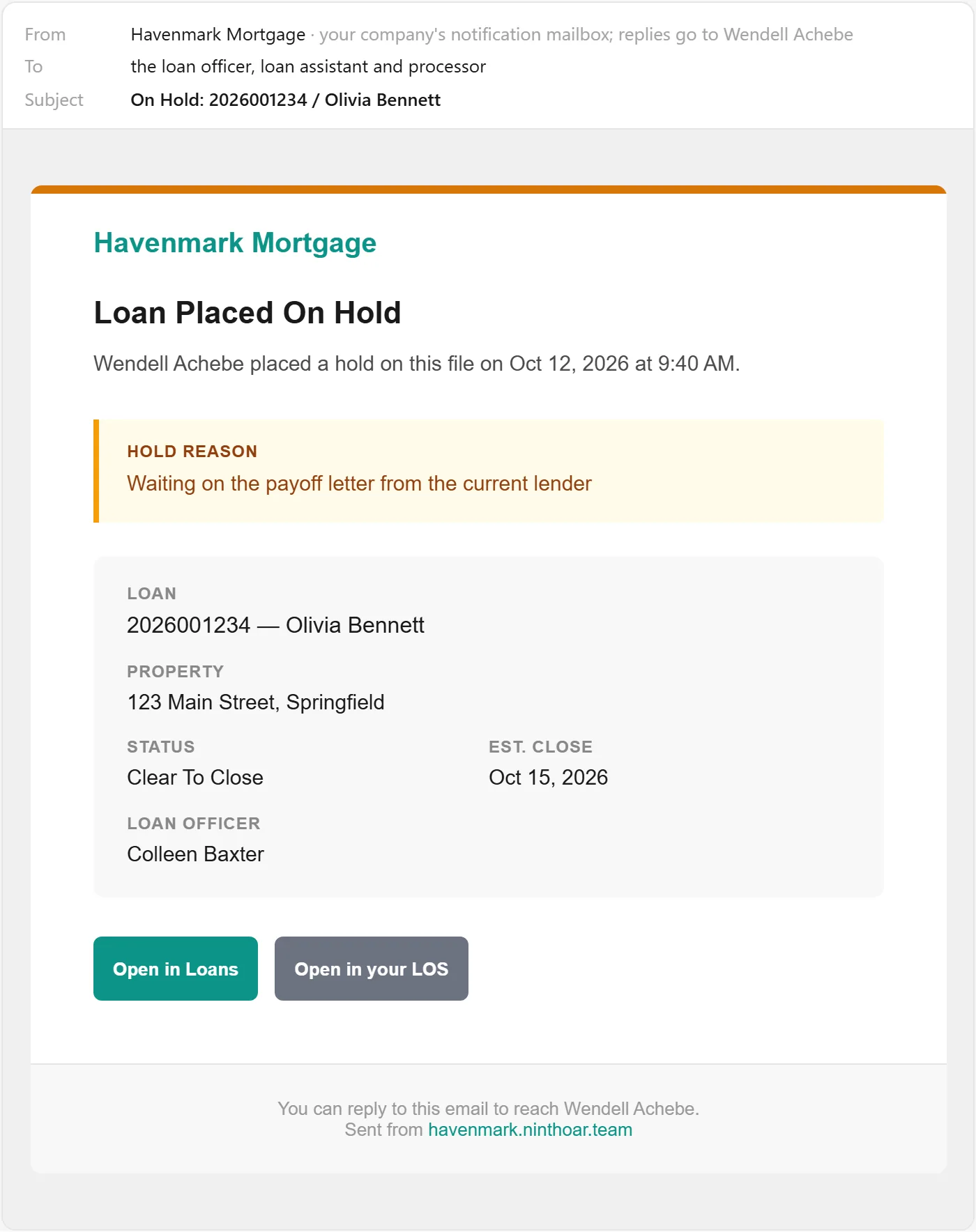
The desk puts the closing on hold with a reason. The loan officer, assistant and processor are emailed at once, the hold tops their Needs Attention lists, and the calendar and the loan both show it until it is released.
Balance alerts
Numbers that move after balancing don’t slip through.
When a file is balanced or the package goes out, NinthOar keeps a snapshot of its figures. If the amount, rate, points, credits or cash to close change afterward in the LOS, the desk gets one alert — not ten — with the old and new figures side by side, and records whether it was acknowledged or rebalanced.
Questions
About closings
Where do closing dates come from?
From your LOS. Each loan sits on its estimated closing date, and moves when the date changes there. A Funding Calendar view puts each loan on the day it should fund instead — the same day, or for a primary-residence refinance, the first business day after the rescission period.
Does the closing calendar work with LendingPad?
Yes. Each closing’s dates, lock and figures come from LendingPad as they change — move a closing date in LendingPad and the calendar follows, usually within a few minutes — while the checklist, holds and closing notes live in NinthOar. How the LendingPad integration works.
Does it work with electronic and paper closings?
Both. On an eClosing the steps check themselves as your eSign provider reports them — package sent, eSign window open, signed, ready to fund. On a wet-sign or hybrid closing the desk checks each step by hand. Either way the closing ends at Ready to Fund.
Who can put a closing on hold?
The disclosure desk, by default — your company can change that per role. The hold carries a reason, reaches the loan officer, assistant and processor by email straight away, and shows on the calendar, the loan and everyone’s Needs Attention list until it is released.
What counts as a balance change?
The loan’s figures — amount, rate, points, credits, cash to close — moving after the file was balanced or the package went out. A burst of edits in the LOS becomes one alert, and a change that is undone cancels it.
Keep going
The rest of the day, covered.
Needs Attention
Locks about to expire, disclosures due, closings on hold and credit about to lapse — with a name on each — before anyone has to ask.
Learn moreWork queues
One list per desk — disclosures, locks, file setup, closings — sorted by deadline, claimed by a person, and nothing waiting in an inbox.
Learn moreManagement reporting
Turn times by stage, files at risk of missing their date, and the difference between a real change and an ordinary bad week.
Learn moreEarly access
Opening to new lenders soon.
NinthOar is in daily use at a lender today. Tell us about your shop, and we’ll reach out as soon as we can take you on.