

Works with LendingPad
Everything LendingPad knows, turned into work your team can see.
Keep originating in LendingPad. NinthOar reads every loan as it changes and builds what operations needs on top of it — the alerts, the desks, the closing calendar, the notes — and brings them back into the loan you have open.
How it works
A loan changes in LendingPad
Someone saves a new closing date, a lock, a status. LendingPad sends the loan to your NinthOar instance — usually within a few minutes.
NinthOar works out what it means
Does the lock still outlast funding? Is the closing disclosure due? Does the credit report cover the new date? The answers land on the right person’s list.
Your team sees it where they work
On their dashboard and desk queues, on the closing calendar — and in the side panel beside the loan they have open in LendingPad.
Beside LendingPad
A side panel that follows the loan you have open.
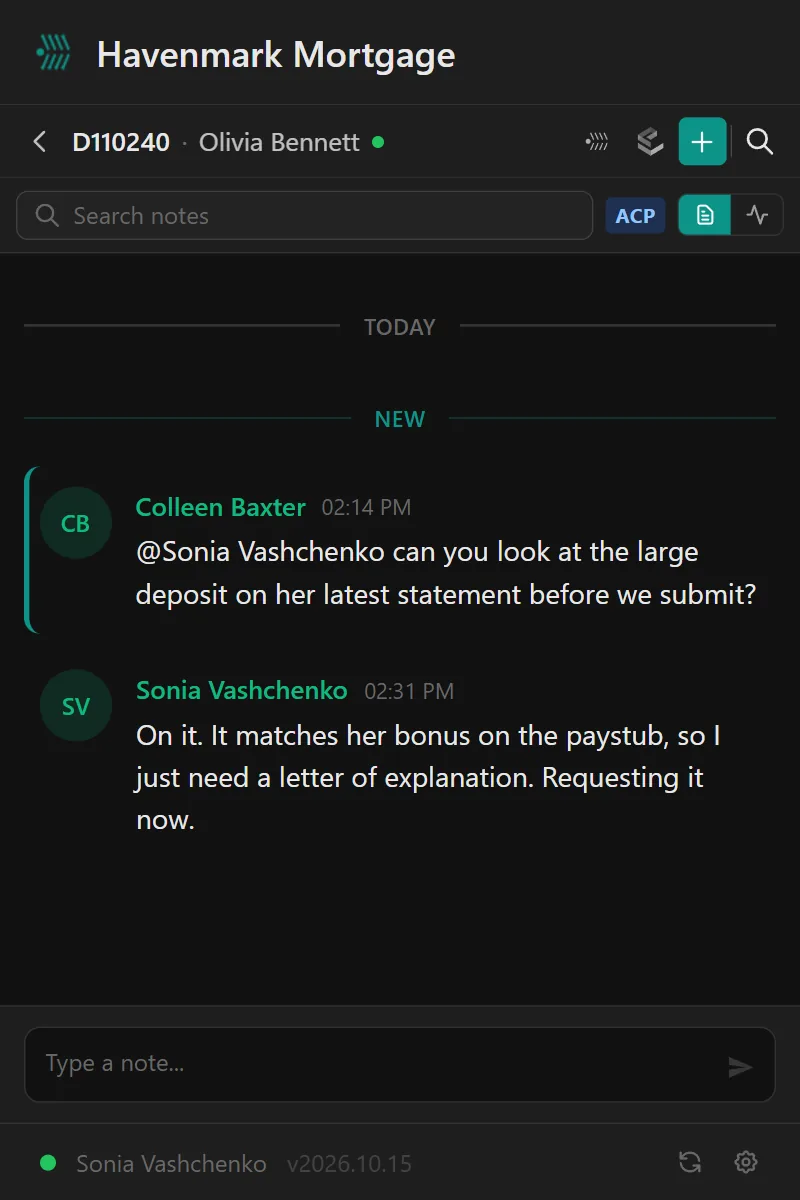
Software fails when nobody opens it. The NinthOar side panel for Chrome opens beside LendingPad and follows the loan on screen — so a processor sees that file’s notes, texts and alerts without a second login or a second tab.
- This loan’s notes, with replies and @mentions.
- Borrower texts, read and answered from the panel.
- Your Needs Attention list, live, your company’s announcements, and a search across the pipeline.
What comes across
The loan as LendingPad has it — and nothing operations doesn’t need.
Status, dates and team
Loan status and milestones, estimated closing and funding dates, the loan officer and the rest of the team — matched to your people by NMLS ID or email.
Locks and pricing dates
The rate lock and its expiration — and the investor’s side where your shop uses it — compared with the funding date every time either one moves.
Conditions
Underwriting conditions grouped the way LendingPad groups them, fetched when someone opens the loan and refreshed in the background.
A history of key dates
When a closing or other key date moves in LendingPad, the loan’s activity records it — “Scheduled closing changed from Oct 14 to Oct 21” — so the change never goes unnoticed.
Never SSNs or birth dates
Social Security numbers and dates of birth are never stored in NinthOar.
Read-only toward LendingPad
Nothing NinthOar does changes a loan in LendingPad. Your LOS stays the system of record.
On top of LendingPad
What your team gets from the loans already in LendingPad.
Needs Attention
Locks about to expire, disclosures due, closings on hold and credit about to lapse — with a name on each — before anyone has to ask.
Learn moreWork queues
One list per desk — disclosures, locks, file setup, closings — sorted by deadline, claimed by a person, and nothing waiting in an inbox.
Learn moreThe loan page
Everything about one loan on one screen: health, milestones, disclosures and who has signed, notes with @mentions, and what the borrower was sent.
Learn moreBorrower texting
Borrowers text the loan, not someone’s cell phone. The whole team sees the thread, consent is on record, and STOP is honored automatically.
Learn moreThe side panel
Notes, alerts and borrower texts beside the loan open in LendingPad — a Chrome side panel that follows the file on screen.
Learn morePhones and tablets
The pipeline as cards, the closing calendar as a month you tap through, and a tab bar under your thumb — in the phone’s browser, nothing to install.
Learn moreClosings
A closing calendar the whole team works from, with each closing’s checklist, holds that alert everyone, and a check against what changed since approval.
Learn moreCompliance training
Training and policy acknowledgments with records nobody can edit or delete — not a manager, not an admin, not us.
Learn moreManagement reporting
Turn times by stage, files at risk of missing their date, and the difference between a real change and an ordinary bad week.
Learn moreQuestions
About the LendingPad integration
Does NinthOar integrate with LendingPad?
Yes. LendingPad sends each loan to your NinthOar instance whenever it changes, usually within a few minutes, and NinthOar turns it into the work operations needs: what needs attention today, a queue for each desk, a closing calendar, a page per loan with its notes, and borrower texting. Your team keeps originating in LendingPad, with NinthOar’s side panel beside the loan.
How do loans get from LendingPad into NinthOar?
LendingPad sends a loan to your NinthOar instance whenever it changes — usually within a few minutes of the change being saved. NinthOar always keeps the newest version: an older or incomplete copy that arrives late is set aside rather than written over what is there.
What data comes over from LendingPad?
The loan as operations needs it: its status and milestones, its key dates — estimated closing and funding, the scheduled closing, contingencies — the loan team, the rate lock and its expiration, and the loan and property details. Underwriting conditions are read from LendingPad when someone opens them. Social Security numbers and dates of birth are never stored.
Does NinthOar change anything in LendingPad?
No. LendingPad stays the system of record and loans are changed there. Notes, disclosure requests, closing steps and holds live in NinthOar and are never written back.
Is there a Chrome extension for LendingPad?
Yes. NinthOar’s side panel is a Chrome extension that opens beside LendingPad and follows the loan you have open: that loan’s notes, its borrower’s texts and what needs attention, without a second tab. See the side panel.
Is borrowers’ sensitive data copied over?
Social Security numbers and dates of birth are never stored in NinthOar. It keeps what operations needs — the loan, its status and dates, its team, its lock, its disclosures and conditions.
What if a loan looks out of date?
Anyone with the permission can pull the latest copy of one loan from LendingPad from its page, and an admin can re-sync a list of loans at once. Each week, loans in progress that haven’t changed in a long while are flagged for an admin.
What about other origination systems?
LendingPad is the one we work with today. If your lender runs something else, tell us which — the next integration is chosen by what lenders actually use.
LendingPad is a trademark of its owner. NinthOar is independent and not affiliated with or endorsed by LendingPad. See our terms of use.
Early access
Running LendingPad? See your pipeline in NinthOar.
NinthOar is in daily use at a lender today. Tell us about your shop, and we’ll reach out as soon as we can take you on.